
Every growing company reaches a point where their software no longer fits. Spreadsheets become unmanageable, the CRM needs workarounds for every process, and the operations team spends more time fighting tools than using them. The question isn't whether you need better software — it's whether you should build it or buy it.
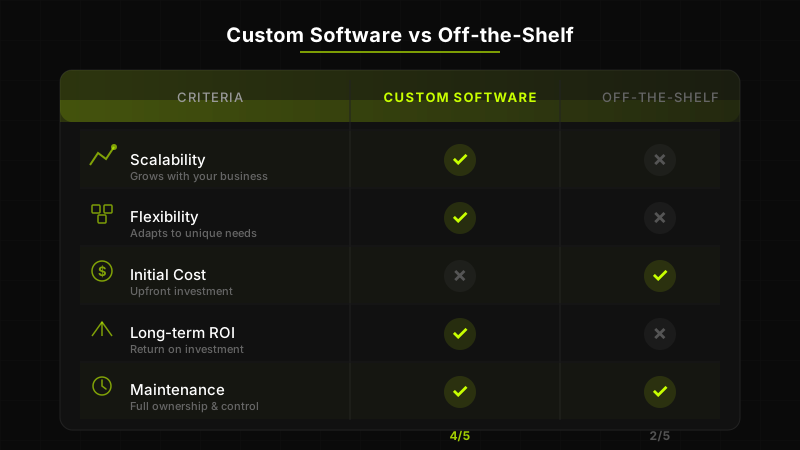
This decision has long-term consequences. Choose wrong, and you'll either overpay for a solution that doesn't fit or underinvest in one that can't scale. This guide gives you a structured framework to make the right call based on your specific situation — not vendor marketing or engineering bias.
When Off-the-Shelf Makes Sense
Off-the-shelf software (also called COTS — Commercial Off-The-Shelf) is pre-built, ready to deploy, and designed to serve a broad market. It is the right choice more often than most custom software advocates will admit. Here are the scenarios where buying makes clear sense:
- Your process is standard and well-understood — Accounting, payroll, basic CRM, email marketing, and project management are solved problems. Tools like QuickBooks, HubSpot, and Jira exist because these workflows are nearly identical across companies. Rebuilding them is reinventing the wheel.
- You need to move fast with limited budget — A startup validating product-market fit should not spend six months building an internal tool. SaaS products give you a working solution in days, not months.
- The domain is heavily regulated with established standards — Tax software, for example, must comply with constantly changing regulations. Vendors like Avalara or Xero invest millions in staying compliant. Building this yourself is impractical.
- You have fewer than 50 users — The per-seat cost of most SaaS tools is reasonable at small scale. The math changes dramatically at 500 or 5,000 users, but for small teams, commercial software is almost always cheaper.
- Integration needs are simple — If your tools need to share data through standard APIs and the volume is low, off-the-shelf integrations (Zapier, native connectors) handle it fine.
- No competitive differentiation is required — If the software supports a back-office function that is not core to your value proposition, a generic tool is sufficient.
The common thread is this: if your needs align with how most companies operate, off-the-shelf software will serve you well at a fraction of the cost and time of a custom build.
When Custom Software Is the Right Choice
Custom software becomes the better investment when your requirements diverge from the mainstream — when the way you operate is itself a competitive advantage, or when off-the-shelf tools create more friction than they solve.
- Your workflow is your competitive advantage — If the way you process orders, manage supply chains, or serve customers is fundamentally different from competitors, forcing that workflow into a generic tool means compromising the very thing that makes you competitive.
- You've outgrown your current tools — When you're spending more on workarounds, integrations, and manual processes than you would on a custom solution, you've crossed the threshold. This is especially common at the 200-500 employee mark.
- Data security and compliance require full control — Industries like healthcare, defense, and financial services often have compliance requirements that commercial SaaS cannot fully satisfy. Custom software lets you control data residency, encryption, access controls, and audit trails at every level.
- Per-seat licensing costs are becoming unsustainable — Enterprise SaaS pricing scales linearly with users. At 1,000+ seats, you may be paying $500K-$1M annually for software you don't fully control. Custom software has a higher upfront cost but a flat operational cost curve.
- You need deep integration across systems — When your operations require real-time data flow between multiple systems (ERP, CRM, IoT devices, legacy databases), custom middleware or a unified platform often outperforms stitching together SaaS products with fragile integrations.
- You need to own the roadmap — With commercial software, you're at the mercy of the vendor's priorities. If a feature you need is on their backlog for 2027, you wait. With custom software, your development team builds what matters most to your business, on your timeline.
The Real Cost Comparison
The most common mistake in the build-vs-buy decision is comparing the wrong numbers. Companies compare the upfront cost of custom development against the monthly subscription of a SaaS tool. This is like comparing the purchase price of a house to one month's rent — it's technically accurate and completely misleading.
The correct comparison is Total Cost of Ownership (TCO) over 3 to 5 years. TCO includes every dollar you'll spend to get value from the software, regardless of whether it's a subscription, a development invoice, or internal labor.
Off-the-Shelf TCO (5-Year Example)
Consider a mid-market company with 300 users adopting a commercial operations platform at $50/user/month. The direct subscription cost is $180,000/year, or $900,000 over five years. But that's not the full picture. Add implementation and configuration ($30K-$80K), training ($15K-$25K per round), third-party integrations ($20K-$50K/year in middleware and developer time), customization within the platform ($10K-$30K/year), and annual price increases (SaaS vendors typically raise prices 5-10% per year). The realistic 5-year TCO is $1.1M to $1.5M — and you own nothing at the end.
Custom Software TCO (5-Year Example)
A comparable custom platform might cost $200K-$350K to build (including discovery, development, testing, and deployment), plus $40K-$80K/year for maintenance, hosting, and incremental improvements. The 5-year TCO is $400K to $750K — and you own the asset outright. At scale, custom software almost always wins on cost. The crossover point typically occurs between 100 and 300 users, depending on the complexity of the application.
Hidden Costs of Off-the-Shelf Software
Beyond the subscription fee, commercial software carries costs that are easy to overlook during the evaluation phase but painful to discover later.
Vendor Lock-In
Once your data, workflows, and team habits are built around a specific platform, switching costs become enormous. Migrating from one CRM to another, for instance, can take 6 to 12 months and cost more than the original implementation. Vendors know this, which is why they make it easy to get in and hard to get out. Proprietary data formats, limited export capabilities, and API rate limits all serve to increase your dependency.
Customization Ceilings
Every off-the-shelf product has a customization boundary. You can configure fields, adjust workflows, and maybe write some scripting — but at some point you hit a wall. When your process requires something the product was not designed for, you end up building workarounds: external scripts, manual data transfers, shadow spreadsheets. These workarounds accumulate technical debt just as surely as poorly written code does.
Per-Seat Pricing at Scale
SaaS pricing models are designed to grow with your company — which means your costs grow linearly while the vendor's cost to serve you grows marginally. A tool that costs $15,000/year for 25 seats costs $300,000/year for 500 seats. For the vendor, the incremental cost of those additional users is negligible. For you, it's a significant budget line item with no additional value.
Feature Bloat and Forced Upgrades
Commercial products serve a broad market, which means they accumulate features that most individual customers don't need. You pay for the entire product even if you use 20% of it. Worse, vendors regularly discontinue products, force migrations to new versions, or deprecate features your team relies on — all on their timeline, not yours.
How to Evaluate Your Needs: A Decision Framework
Before comparing vendors or soliciting development proposals, answer these questions honestly. They form the foundation of a sound decision.
- Is this process a competitive differentiator or a commodity function? If your competitors use the same tool and it works fine, it's probably commodity. Buy it.
- How many users will need access in 1, 3, and 5 years? If the number is growing significantly, model the SaaS cost trajectory against a custom build.
- How unique are your workflows? If you can map your process to a commercial product with minimal customization (under 20% deviation), off-the-shelf is likely sufficient.
- What are your data sovereignty and compliance requirements? If your industry has strict data handling regulations, evaluate whether SaaS vendors can fully comply.
- How critical is integration with existing systems? Rate each integration as simple (API-to-API), moderate (data transformation required), or complex (real-time bidirectional sync). More complex integrations favor custom solutions.
- What is your tolerance for vendor dependency? If the vendor goes out of business, raises prices 40%, or deprecates a key feature, what is your fallback?
- Do you have (or can you hire) the technical capacity to maintain custom software? Custom software requires ongoing investment. If you have no engineering culture, factor in the cost of managed maintenance.
The Build vs Buy Matrix: Specific Scenarios
Theory is useful, but concrete scenarios make the decision clearer. Here's how the framework applies to common business situations.
Fintech Compliance Platform
A fintech company handling KYC/AML compliance across multiple jurisdictions. Off-the-shelf tools like Jumio or Onfido handle standard verification, but if your compliance workflow involves custom risk scoring, jurisdiction-specific rules, and integration with proprietary data sources, a custom platform built on top of third-party verification APIs is the better long-term investment. Verdict: Hybrid — use commercial APIs for identity verification, build custom logic and workflows.
Internal Operations Dashboard
A logistics company with 15 warehouse locations needs real-time visibility across inventory, shipments, and workforce allocation. Off-the-shelf BI tools like Tableau or Power BI can handle the visualization, but the data aggregation layer — pulling from WMS, TMS, HRIS, and IoT sensors in real time — requires custom development. Verdict: Custom data layer with commercial visualization where appropriate.
Customer-Facing Portal
An insurance company wants a self-service portal where customers manage policies, file claims, and track status. If the portal mirrors standard industry workflows, a white-label solution might work. But if the claims process is a key differentiator — faster processing, AI-assisted assessment, unique policy structures — custom is justified. Verdict: Depends entirely on whether the customer experience is a competitive advantage.
HR and Payroll
Unless you're an HR tech company, there is almost never a good reason to build custom payroll or HR management software. The regulatory complexity alone (tax codes, labor laws, benefits administration across jurisdictions) makes this a buy-not-build category for 99% of companies. Verdict: Buy. Use BambooHR, Gusto, Workday, or an equivalent.
What About Low-Code and No-Code Platforms?
Low-code and no-code platforms like Retool, Bubble, OutSystems, and Mendix occupy a middle ground between off-the-shelf and fully custom software. They promise faster development with less engineering overhead. The promise is partially true — with important caveats.
Where Low-Code Excels
Internal tools for small teams (under 50 users), admin dashboards, data entry forms, and simple approval workflows are ideal low-code use cases. If the application is internal, the user base is small, and the logic is straightforward, low-code can deliver a working solution in days instead of weeks.
Where Low-Code Falls Short
Performance-critical applications, complex business logic, customer-facing products with brand-specific UX, and anything requiring deep integration with AI/ML pipelines will push against low-code limitations quickly. You'll spend as much time working around the platform's constraints as you would have spent building the feature properly.
There's also a hidden cost: low-code platforms are themselves vendors. You're trading one form of vendor lock-in for another. Your application logic lives on their platform, in their proprietary format. If you outgrow the platform or the vendor changes pricing, migration is painful.
The Honest Assessment
Low-code is excellent for prototyping, internal tools, and MVPs. It is not a replacement for custom software development when the application is core to your business, customer-facing, or needs to scale beyond a few hundred users. Think of it as a stepping stone: validate the concept in low-code, then invest in custom development once the requirements are proven.
Making the Decision
There's no universal answer to the build-vs-buy question because the right choice depends on your specific context: your industry, your scale, your technical capacity, and where software fits in your competitive strategy. But here's a simple heuristic that holds up well across scenarios.
If the software supports a function where you want to be average, buy it. If it supports a function where you need to be exceptional, build it. Average accounting? Use QuickBooks. Exceptional customer onboarding that drives retention? Build it custom.
The most successful companies we work with don't treat this as an either/or decision. They use a portfolio approach: commercial tools for commodity functions, custom software for competitive advantages, and integrations to connect everything into a coherent system.
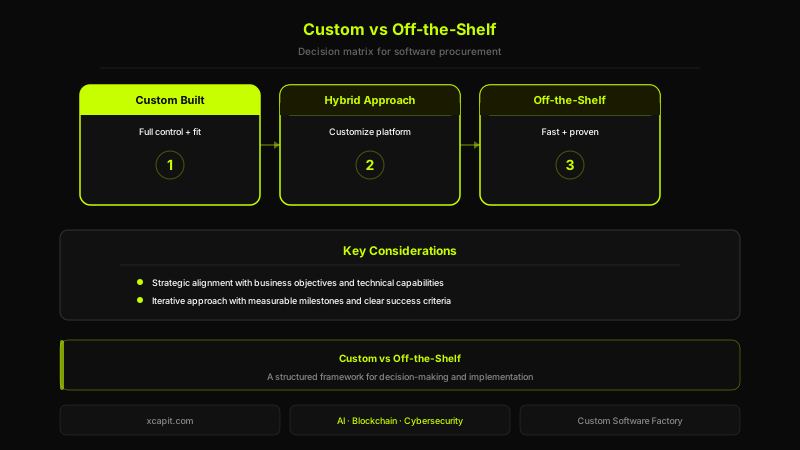
If you're evaluating whether custom software is the right investment for your organization, start with a structured assessment of your workflows, costs, and strategic priorities. At Xcapit, we offer a Discovery engagement specifically designed to help companies answer this question with data, not guesswork — before committing to a full build. Learn more about our approach to custom software development.

Santiago Villarruel
Product Manager
Industrial engineer with over 10 years of experience excelling in digital product and Web3 development. Combines technical expertise with visionary leadership to deliver impactful software solutions.
Need custom software that scales?
From MVPs to enterprise platforms — built right.
You Might Also Like
Custom software or an existing solution? How to make the best decision for your company
Buy or build is one of the most important decisions in any digital transformation project. When each option makes sense, why the right question is not binary, and how to assess long-term impact.
Software Factory vs In-House Development: A Decision Framework for 2026
A balanced, data-driven guide for CTOs and engineering leaders comparing in-house development teams with software factory partnerships. Includes cost breakdowns, decision criteria, hybrid models, and a structured framework to make the right choice for your organization.
Outsourcing Software Development to Argentina: A 2026 Guide for US & European Companies
Everything you need to know about outsourcing software development to Argentina -- from timezone advantages and talent pool to legal frameworks, costs, and how to choose the right partner.