

AI agents are getting remarkably capable. They reason through multi-step problems, use tools, adapt to context, and accomplish work that previously required dedicated human attention. But here is the uncomfortable truth most engineering teams are ignoring: the interface between the agent and the user is now the bottleneck. We have spent enormous effort making agents smarter. We have spent almost no effort making them usable.
The result is a generation of AI products where the interface is an afterthought -- a chat box slapped onto a powerful backend. Users are expected to know what to ask, how to phrase it, and how to interpret unstructured responses. This is the equivalent of giving someone a command-line terminal and calling it a consumer product. The technology works. The experience does not.
After a decade of designing digital products and two years focused on AI agent interfaces, I have developed strong opinions about what works and what fails. This post is a practical guide for product managers, designers, and engineers building the layer between AI agents and the humans who use them.
The UX Challenge: Power vs. Complexity
The fundamental tension in AI agent UX is between capability and comprehensibility. An agent that can query databases, draft documents, analyze data, and send emails is enormously powerful. But surfacing all of that power without overwhelming the user is a design problem most teams solve badly.
The most common failure mode is what I call the blank prompt problem. The user opens the interface and sees a text input with a blinking cursor. No guidance on what the agent can do. No structure for common tasks. No indication of what a good request looks like. The user is expected to already know the agent's capabilities and preferred input format -- information they almost certainly do not have. The opposite failure is equally damaging: overwhelming the user with options, toggles, and configuration screens because someone, somewhere, might need them.
Good AI agent UX lives in the narrow space between these extremes. It reveals capability progressively, guides users toward successful interactions, and hides complexity until it is explicitly needed.
Chat Is Not Always the Answer
The conversational interface has become the default paradigm for AI products, and it is wrong far more often than it is right. Chat works for open-ended exploration and ambiguous requests where the user does not know what they want until they start talking. It works poorly for structured tasks, repeated workflows, and situations where the user knows exactly what they need.
When Chat Works
Chat is the right pattern for first-contact exploration, genuinely novel requests that do not fit predefined categories, and iterative refinement where the output needs multiple rounds of feedback. In these cases, the open-endedness of chat is a feature, not a limitation.
When Structured UI Wins
For repeated workflows -- generating a weekly report, processing invoices, reviewing documents -- a structured interface with predefined fields and action buttons is dramatically more efficient than typing a prompt from scratch every time. The user should not have to retype 'Analyze last week's sales data by region, compared to last year, flag anomalies above 15%' when a form with four fields captures the same intent in five seconds.
When Ambient AI Is Best
The most powerful pattern is often no visible interface at all. Ambient AI works in the background -- auto-categorizing emails, flagging anomalies in dashboards, pre-filling forms based on context. The user does not interact with the agent. The agent observes the user's context and acts proactively. When ambient AI works well, users describe the experience as 'the system just knows what I need.' That is the highest compliment an AI product can receive.
Trust and Transparency
Trust is the currency of AI agent UX. Users who do not trust the agent will not use it, regardless of capability. Trust is not binary -- it is earned incrementally through consistent, transparent behavior. Three principles build it reliably.
Show Confidence Levels
When an agent makes a decision, it should communicate how confident it is -- not as a raw probability score, but through clear categorical signals. A green checkmark for high-confidence results. An amber indicator for results worth reviewing. A red flag for cases where the agent acknowledges uncertainty and requests human judgment. These signals teach users when to trust the output and when to apply scrutiny.
Explain Reasoning on Demand
Transparency does not mean showing every reasoning step by default -- that overwhelms users. It means making the reasoning available when users want it. A 'Why?' button lets curious users dig into the agent's logic without cluttering the interface for those who just want the result. The explanation should reference the specific data that influenced the decision and be honest about limitations: 'I based this on 90 days of data. I did not have access to last month's marketing budget changes, which might affect the analysis.'
Always Provide Escape Hatches
Users must always be able to override the agent's decisions, undo its actions, or fall back to manual processes. An agent that takes irreversible actions without confirmation destroys trust instantly -- one bad experience is enough to make a user abandon the product. Every action should be reversible by default or require explicit confirmation. The escape hatch is not a failure of the AI -- it is a fundamental requirement of good UX.
Progressive Autonomy
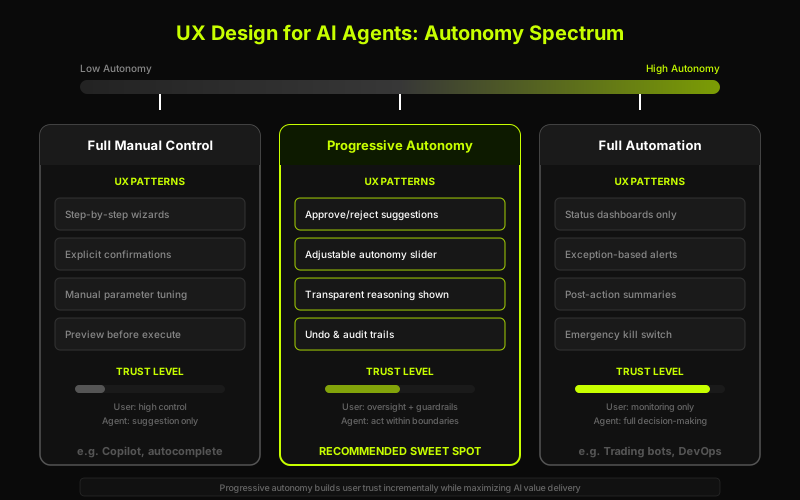
One of the most effective patterns is progressive autonomy -- starting with the agent in a supervised mode and gradually increasing its authority as the user builds confidence.
In practice, this works as a three-tier system. At the first tier, the agent suggests actions but takes none -- it drafts emails but the user sends them, it recommends expense categories but the user confirms each one. At the second tier, the agent acts autonomously for routine tasks but asks permission for anything unusual -- it auto-categorizes clear-cut expenses but flags ambiguous ones for review. At the third tier, the agent operates fully autonomously within defined boundaries, reporting results after the fact rather than seeking permission in advance.
The key insight is that the user controls the transition between tiers. The agent might suggest moving up ('I have categorized 200 expenses this week with 99% accuracy -- would you like me to handle these automatically?'), but the user decides when to grant authority. Trust is calibrated to actual performance, not marketing claims.
Error Handling: When the Agent Fails
Every AI agent will fail. LLMs hallucinate. Tools return unexpected errors. Context gets lost. The quality of an AI product is measured not by how often the agent succeeds but by how gracefully it handles failure.
Graceful Degradation
When the agent cannot complete a task fully, it should complete as much as it can and clearly communicate what remains. If asked to generate a financial report and the Q3 data source is unavailable, the correct behavior is to generate the report with available data, mark the Q3 section as incomplete, explain why, and offer to retry when the data becomes available. The incorrect behavior -- which most agents exhibit -- is to either fail with a vague error message or silently generate a report with missing data.
Clear, Honest Feedback
Error messages should be specific, honest, and actionable. 'Something went wrong' is useless. 'I could not access the sales database -- the connection timed out. This usually resolves in a few minutes. Retry automatically when restored?' is useful. The user knows what happened and what their options are. Honesty extends to the agent's own limitations: 'I am not confident in this result because the input data had inconsistencies -- I recommend reviewing the source data before acting' is far more valuable than a confident-sounding wrong answer.
The Feedback Loop: How Users Correct and Train
The best AI agent interfaces create natural feedback loops where every user interaction improves the agent's future performance -- without requiring the user to explicitly 'train' anything. When a user edits the agent's output, that edit is a signal. When a user rejects a suggestion, that rejection is a signal. When a user consistently shortens emails or changes report formats, those patterns are signals the agent should learn from.
The UX challenge is making this feedback loop visible without making it burdensome. A subtle 'Got it -- I will remember this preference' confirmation when the agent detects a consistent pattern. A preferences panel where users can review learned behaviors. An occasional 'I noticed you always change X to Y -- should I start doing this automatically?' The feedback loop should feel like working with a colleague who pays attention and adapts, not like training a machine learning model.
Multi-Step Workflows
Many valuable agent tasks are multi-step workflows that unfold over minutes or hours -- processing document batches, conducting research, executing data migrations. These require a different UX model than the request-response pattern of a chatbot.
Progress Indicators and Checkpoints
Users need to understand where the agent is in a multi-step process. A progress indicator showing 'Step 3 of 7: Analyzing financial statements' gives confidence that the agent is working. But progress indicators alone are insufficient. Checkpoints -- points where the agent pauses to show intermediate results and get confirmation -- are essential for high-stakes workflows. The user should be able to review work at each checkpoint, provide corrections, and decide whether to continue or abort.
Human Approval Gates
For irreversible actions within a workflow, implement explicit approval gates. The agent presents what it intends to do with full context and waits for confirmation. This is different from a generic 'Are you sure?' dialog. 'I am about to send 847 personalized emails to your customer list. Here is a sample of 5 for review. They will be sent from marketing@company.com over 2 hours. Approve or cancel?' That level of specificity turns approval gates from annoying interruptions into valuable safety nets.
Patterns That Work
After building and reviewing dozens of AI agent interfaces, certain design patterns consistently produce good outcomes.
- Command palettes -- A keyboard-driven interface (Cmd+K) that lets power users invoke agent capabilities without navigating menus, combining free-text input with structured commands.
- Suggestion chips -- Contextual, clickable suggestions based on current state. On a financial dashboard, chips like 'Summarize Q3 performance' or 'Compare to last year' eliminate the blank prompt problem.
- Inline actions -- Agent capabilities embedded directly in the content the user is working with. A highlighted spreadsheet anomaly with a hover tooltip offering 'Investigate this outlier' is more discoverable than a separate chat interface.
- Ambient notifications -- Low-priority agent observations in a notification panel. 'Three invoices do not match existing purchase orders' surfaces valuable information without demanding immediate attention.
- Streaming output with early interaction -- Showing the agent's work as it happens, letting users redirect immediately if it goes off course rather than waiting for the complete wrong output.
Anti-Patterns to Avoid
Equally important is recognizing patterns that consistently produce bad outcomes -- decisions that look reasonable in a product review but fail in real-world use.
- Chatbot-everything -- Forcing every interaction through conversation, including tasks that are faster with traditional UI. A date picker is better than typing 'schedule for next Tuesday at 3pm' and hoping the agent parses it correctly.
- Black box decisions -- Recommendations with no way to understand why. Even a one-sentence explanation ('Based on your spending patterns in the last 6 months') is dramatically better than nothing.
- No undo -- Agent actions that cannot be reversed. This single anti-pattern has killed more AI products than any technical limitation. If users fear the agent might do something they cannot fix, they will stop using it.
- Overwhelming options -- Every parameter and setting on a single screen. Most users need three options, not thirty. Progressive disclosure -- basic options first, advanced settings on request -- respects cognitive load.
- Fake confidence -- Uncertain results presented with the same visual treatment as certain ones. When users discover the agent was wrong about something it appeared confident about, they lose trust in all outputs.
The Invisible AI Ideal
The ultimate goal of AI agent UX is counterintuitive: the best AI experience is one where the user does not think about AI at all. When autocomplete suggests the right word, you just type faster. When your email client sorts important messages to the top, you just see your important email first. You do not think about the model behind it.
This is the invisible AI ideal -- the agent's capabilities are woven so naturally into the workflow that they feel like features of the product, not interactions with an AI system. The user's mental model is not 'I am using an AI agent' but 'this tool helps me get my work done.' The distinction shifts focus from the technology to the outcome, which is where it belongs.
Achieving invisible AI requires discipline. Resist the urge to label everything 'AI-powered.' Choose ambient patterns over conversational ones wherever possible. Measure success not by how impressed users are with the AI, but by how quickly they accomplish their goals. The most successful AI products share a common trait: users forget they are using AI. They just notice they are getting more done.
Designing the Next Generation of AI Interfaces
We are still in the early innings of AI agent UX. These patterns are emerging best practices, not settled science. But one thing is certain: the companies that invest in thoughtful AI interface design will build products users actually adopt. The agent that is 80% as capable but 200% as usable will beat the more powerful agent with the worse interface every time.
The shift requires engineers collaborating with designers from day one, not bolting on a UI after the agent is built. Product managers defining success in terms of user outcomes, not model benchmarks. And everyone internalizing the principle that the user does not want to see the prompt -- they want to see the result.
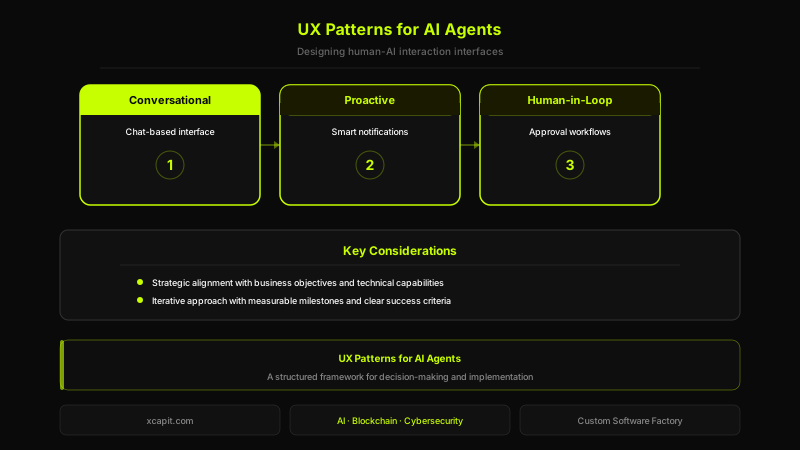
At Xcapit, we design and build AI agent systems with user experience as a first-class concern -- from interaction pattern selection to trust architecture to progressive autonomy frameworks. If you are building an AI-powered product and struggling with the UX layer, we would welcome the conversation. Learn more about our AI development services at /services/ai-development or our custom software capabilities at /services/custom-software.

Santiago Villarruel
Product Manager
Industrial engineer with over 10 years of experience excelling in digital product and Web3 development. Combines technical expertise with visionary leadership to deliver impactful software solutions.
Ready to leverage AI & Machine Learning?
From predictive models to MLOps — we make AI work for you.
You Might Also Like
MWC 2026: The Agentic Era Is No Longer a Promise — It's Strategy
Three lessons from Mobile World Congress 2026 redefining how enterprises adopt AI: from pilot to real value, from isolated agents to orchestrated enterprises, and why company size no longer matters.
From OpenClaw to Agentor: Building Secure AI Agents in Rust
How a security audit of an open-source AI agents framework revealed Python's limits and led us to build Agentor -- a Rust-based framework optimized for code generation.
Designing Autonomous Agents with LLMs: Lessons Learned
How we architect autonomous AI agents in production -- from perception-planning-execution loops to orchestration patterns, memory systems, and guardrails.