
AI models are powerful reasoning engines, but they become truly transformative only when they can interact with the real world — querying databases, sending messages, reading documents, executing code, and triggering workflows. The problem is that connecting AI to external tools has been a fragmented, expensive, and brittle process. Every new tool requires custom integration code, every model provider has its own function-calling format, and every enterprise has unique security requirements. The result is an integration nightmare that slows AI adoption and limits what AI systems can actually do.
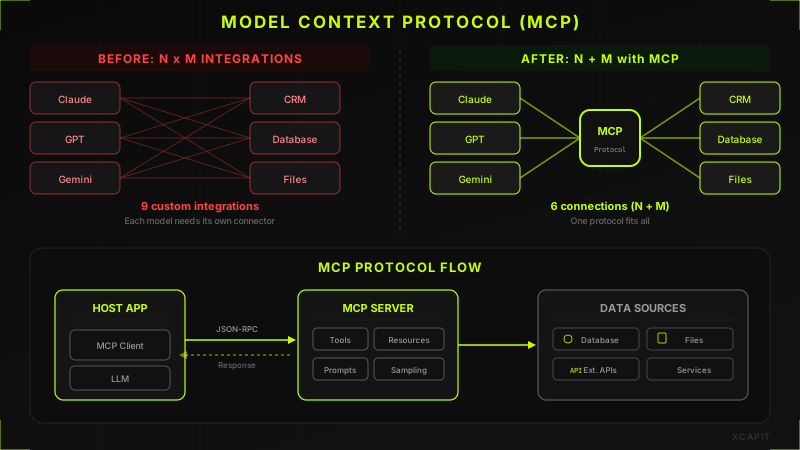
The Model Context Protocol (MCP) is changing this. By providing a universal, open standard for how AI models discover, authenticate with, and use external tools, MCP is doing for AI tool integration what HTTP did for web communication — creating a shared foundation that makes everything else possible.
The Problem MCP Solves
Before MCP, integrating AI models with external tools meant facing what engineers call the N-times-M problem. If you have N different AI models (GPT, Claude, Gemini, Llama, Mistral) and M different tools (Slack, GitHub, Jira, Salesforce, your internal database), you need N times M custom integrations. Each integration has its own authentication flow, its own data format, its own error handling, and its own maintenance burden.
For a company using three AI models and ten tools, that is thirty separate integrations to build and maintain. Add a new tool, and you need three more integrations. Switch AI providers, and every tool connection needs to be rebuilt. This combinatorial explosion creates enormous technical debt and makes it impractical for organizations to give their AI systems access to the full range of tools they need.
The fragmentation goes deeper than just the number of integrations. Different AI providers handle function calling differently. OpenAI uses a JSON schema format for tool definitions. Anthropic uses a similar but not identical format. Open-source models have their own conventions. Each provider's function-calling implementation has different capabilities, limitations, and quirks. Developers end up writing adapter layers on top of adapter layers, and the resulting systems are fragile, hard to debug, and expensive to maintain.
What Is the Model Context Protocol?
The Model Context Protocol, or MCP, is an open standard introduced by Anthropic that defines how AI models communicate with external tools and data sources. Think of it as a universal adapter — instead of building custom integrations between every model and every tool, tool developers build a single MCP server, and model providers build a single MCP client. Any MCP-compatible model can then use any MCP-compatible tool, regardless of who built either side.
MCP defines three core abstractions. First, Tools — discrete capabilities that the AI model can invoke, like searching a database, creating a calendar event, or running a SQL query. Second, Resources — data sources that the model can read from, like files, database records, or API responses, providing context without requiring tool invocation. Third, Prompts — reusable templates and instructions that help the model use tools effectively in specific domains.
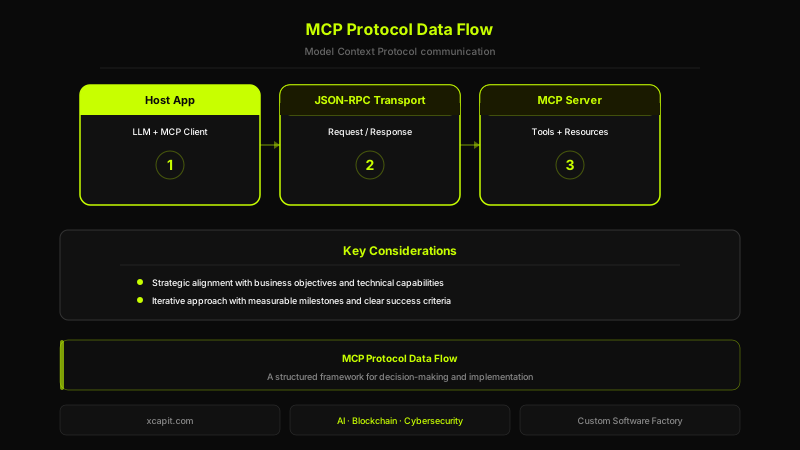
The protocol is transport-agnostic, meaning it can run over standard I/O for local tools, HTTP with Server-Sent Events for remote tools, or any other transport layer. It uses JSON-RPC 2.0 as its message format, which is simple, well-understood, and widely supported. The specification is open-source and evolving through community contributions, with Anthropic maintaining the core specification while encouraging broad adoption.
Critically, MCP is not tied to any single AI provider. While Anthropic created it, the protocol is designed to be used by any model — proprietary or open-source. This neutrality is key to its adoption, because tool developers only need to build their MCP server once and it works everywhere.
How MCP Servers Work
Server Architecture
An MCP server is a lightweight process that exposes tools, resources, and prompts to AI models through the MCP protocol. The server can be as simple as a single-file script exposing one tool, or as complex as a multi-service application managing dozens of capabilities with sophisticated authorization logic.
The typical architecture consists of three layers. The transport layer handles communication — receiving requests and sending responses over stdio, HTTP/SSE, or WebSocket connections. The protocol layer implements the MCP message format, handling capability negotiation, request routing, and response formatting. The capability layer contains the actual tool logic — the code that queries your database, calls your API, or processes your data.
MCP servers are designed to be stateful within a session but stateless across sessions. During a conversation, the server can maintain context — for example, remembering that the user has already authenticated or tracking which database connection is active. But each new session starts fresh, ensuring predictability and simplifying deployment.
Tool Registration
When an MCP client connects to a server, the first thing that happens is capability negotiation. The server declares what tools it offers, including their names, descriptions, and input schemas. The AI model uses these descriptions to understand when and how to use each tool — the description is essentially documentation that the model reads to decide whether a tool is relevant to the current task.
Good tool descriptions are critical. A well-described tool includes not just what it does, but when to use it, what inputs it expects, what outputs it returns, and what side effects it may have. Poor descriptions lead to the model misusing tools or failing to use them when appropriate. In practice, writing effective tool descriptions is one of the most important skills in MCP server development.
Tool input schemas use JSON Schema, allowing servers to define required and optional parameters, types, constraints, and default values. The model validates its inputs against these schemas before making a tool call, catching errors before they reach the server.
Context Management
One of MCP's most powerful features is its resource system, which allows servers to provide contextual data to the model without requiring a tool call. Resources can be documents, configuration files, database schemas, or any structured data that helps the model understand the environment it is working in.
For example, a database MCP server might expose the database schema as a resource. When the model needs to write a SQL query, it can reference the schema to understand table names, column types, and relationships — without needing to make a separate tool call to fetch this information. This reduces latency, lowers token costs, and improves accuracy.
Resources can be static (loaded once when the session starts) or dynamic (updated as conditions change). The server controls which resources are available and can update them in response to tool calls or external events.
Security Model
MCP takes a security-first approach. The protocol supports human-in-the-loop confirmation for sensitive operations, meaning the AI model can request permission before executing actions that modify data, spend money, or access restricted resources. This is crucial for enterprise deployment where AI systems must operate within defined boundaries.
Authentication and authorization are handled at the server level. Each MCP server defines its own authentication requirements — API keys, OAuth tokens, certificate-based authentication, or any other mechanism appropriate for the tools it exposes. The MCP client passes credentials to the server, but the server is responsible for validating them and enforcing access controls.
The protocol also supports capability scoping, allowing servers to expose different tools to different users or contexts. An admin user might have access to write and delete operations, while a regular user only sees read-only tools. This granular control is essential for multi-tenant enterprise environments.
MCP vs Traditional API Integration
Understanding MCP's value requires comparing it to the alternatives that developers have been using to connect AI models to external systems.
With traditional REST API integration, developers write custom code to translate between the AI model's function-calling format and each API's request/response format. This works but creates tight coupling — changes to either the API or the model's function-calling format break the integration. Each API has its own authentication, pagination, error handling, and rate limiting conventions, all of which must be handled individually.
Native function calling, as offered by providers like OpenAI and Anthropic, simplifies the model side by providing a structured way to define and invoke tools. But the tool implementation is still left to the developer, and tool definitions are provider-specific. A tool built for OpenAI's function calling does not work with Claude's, and vice versa.
Webhook-based integrations reverse the direction — instead of the AI calling tools, tools push events to the AI. This works for event-driven workflows but is difficult to use for interactive, conversational tool use where the model needs to make decisions based on tool outputs.
MCP combines the best aspects of these approaches while eliminating their limitations. It provides structured tool definitions like function calling, supports both pull and push communication patterns, and does it all through a single standard that works across providers. The result is integrations that are more portable, more maintainable, and more secure.
Building Your First MCP Server
Creating an MCP server is more accessible than it might sound. The ecosystem provides SDKs in multiple languages — TypeScript, Python, Java, and Kotlin are all well-supported — that handle the protocol layer, leaving developers to focus on the tool logic itself.
A basic MCP server consists of four components. The server initialization code sets up the transport layer and registers capabilities. The tool definitions declare what tools are available, including their descriptions and input schemas. The tool handlers contain the actual logic — the code that runs when the model invokes a tool. And the resource definitions provide contextual data that the model can reference.
The development workflow is straightforward. Start by identifying the capability you want to expose — say, querying a customer database. Define the tool with a clear name, a description that explains when to use it, and an input schema that specifies query parameters. Implement the handler that executes the query and returns structured results. Test the server locally using an MCP inspector tool, which lets you simulate model requests and verify responses.
One of the best practices in MCP server development is to keep tools focused and composable. Instead of building one massive tool that does everything, build small tools that each do one thing well. A database server might have separate tools for listing tables, describing a table's schema, running a read-only query, and executing a write operation. This gives the model more flexibility and makes the system easier to secure — you can grant read access without granting write access.
Error handling deserves special attention. MCP tools should return structured error responses that help the model understand what went wrong and how to recover. A good error response includes an error code, a human-readable message, and suggestions for alternative approaches. This allows the model to retry with different parameters, try a different tool, or explain the issue to the user — rather than simply failing.
Enterprise MCP Patterns
Multi-Tool Orchestration
In enterprise environments, AI agents often need to coordinate multiple tools to complete complex tasks. An agent handling a customer support case might need to look up the customer in the CRM, check their order history in the ERP, review recent support tickets, and draft a response — all in a single conversation. MCP's session-based architecture supports this naturally, allowing the model to maintain context across multiple tool calls within a single interaction.
For complex orchestration patterns, enterprises often deploy an MCP gateway that sits between the AI model and multiple backend MCP servers. The gateway handles routing, load balancing, and cross-service coordination, presenting a unified interface to the model while distributing requests to the appropriate backend servers.
Authentication and Authorization
Enterprise MCP deployments require robust identity management. The common pattern is to integrate MCP servers with existing identity providers using OAuth 2.0 or SAML. When a user starts an AI session, their identity is propagated to all MCP servers, which enforce role-based access controls consistent with the organization's existing permissions model.
This means that when an AI agent queries a database on behalf of a sales manager, it sees only the data that the sales manager is authorized to access. The AI does not get elevated privileges — it operates within the same security boundaries as the human user it is assisting.
Rate Limiting and Cost Control
AI tool usage can generate significant costs, both in API calls to external services and in compute resources for internal tools. Enterprise MCP deployments typically implement rate limiting at multiple levels — per user, per tool, per time window — to prevent runaway costs and ensure fair resource allocation.
Budget controls can be embedded directly in MCP servers. A server that calls a paid API can track spending and refuse requests once a budget threshold is reached. A server that queries a database can limit the number of rows returned or the query execution time. These controls are transparent to the model — the tool simply returns an error explaining the limit, and the model can inform the user or adjust its approach.
Logging and Audit Trails
For regulated industries — finance, healthcare, government — every AI tool invocation must be logged with full context: who requested it, what parameters were sent, what data was accessed, and what results were returned. MCP's structured request/response format makes this straightforward. Every tool call is a discrete, well-defined event that can be captured, stored, and analyzed.
Audit logging at the MCP layer provides a complete record of what the AI system did and why. This is invaluable for compliance, incident investigation, and continuous improvement. Organizations can analyze tool usage patterns to identify inefficiencies, detect anomalies, and optimize their AI deployments over time.
Real-World Applications
MCP servers are already enabling a wide range of enterprise applications that were previously impractical due to integration complexity.
- CRM integration: AI agents that can search contacts, update deal stages, log activities, and generate pipeline reports directly from conversation — turning Salesforce, HubSpot, or custom CRMs into conversational interfaces
- Database querying: Natural-language access to SQL and NoSQL databases, with schema-aware query generation, result formatting, and write protection — enabling non-technical users to extract insights without writing code
- Document management: AI systems that can search, read, summarize, and cross-reference documents across SharePoint, Google Drive, Confluence, and other platforms — breaking down information silos that exist in every large organization
- Code repositories: Development tools that can search codebases, review pull requests, analyze dependencies, and explain code behavior — accelerating developer productivity and knowledge sharing
- Monitoring dashboards: AI agents that can query metrics, correlate alerts, and diagnose incidents across Datadog, Grafana, PagerDuty, and cloud provider consoles — reducing mean time to resolution for operational issues
- Financial systems: Secure access to accounting, invoicing, and payment platforms with role-based controls — enabling AI-assisted financial analysis while maintaining strict data governance
- Communication platforms: Integration with Slack, Teams, and email systems that allows AI agents to search message history, draft responses, and manage notifications — streamlining internal communication workflows
The Future of AI Tool Ecosystems
MCP represents a fundamental shift in how we think about AI capabilities. Instead of building increasingly large models that try to internalize all knowledge, the industry is moving toward models that are excellent at reasoning and communication, connected to specialized tools that handle everything else. This modular approach is more scalable, more maintainable, and more secure than trying to bake every capability into the model itself.
The ecosystem is growing rapidly. Open-source MCP server repositories now cover hundreds of common tools and services. Cloud providers are building native MCP support into their AI platforms. Enterprise software vendors are starting to ship MCP servers alongside their products, recognizing that AI integration is becoming a baseline expectation.
We expect several trends to accelerate in the coming years. Tool marketplaces will emerge where organizations can discover and deploy pre-built MCP servers. Composition frameworks will make it easier to combine multiple tools into sophisticated workflows. And certification programs will help enterprises evaluate the security and reliability of third-party MCP servers before deploying them in production.
The organizations that invest in MCP now — building their own servers, training their teams, and establishing governance frameworks — will have a significant advantage as AI becomes central to business operations. The integration problem is being solved. The question is whether your organization will be ready to take advantage of it.
At Xcapit, we help enterprises design, build, and deploy AI agent systems with robust tool integration. From MCP server development to full AI agent architectures, our team has deep experience making AI work in production environments. Explore our AI agent development services to learn how we can accelerate your AI integration strategy.

Fernando Boiero
CTO & Co-Founder
Over 20 years in the tech industry. Founder and director of Blockchain Lab, university professor, and certified PMP. Expert and thought leader in cybersecurity, blockchain, and artificial intelligence.
Ready to leverage AI & Machine Learning?
From predictive models to MLOps — we make AI work for you.
You Might Also Like
MWC 2026: The Agentic Era Is No Longer a Promise — It's Strategy
Three lessons from Mobile World Congress 2026 redefining how enterprises adopt AI: from pilot to real value, from isolated agents to orchestrated enterprises, and why company size no longer matters.
From OpenClaw to Agentor: Building Secure AI Agents in Rust
How a security audit of an open-source AI agents framework revealed Python's limits and led us to build Agentor -- a Rust-based framework optimized for code generation.
Designing Autonomous Agents with LLMs: Lessons Learned
How we architect autonomous AI agents in production -- from perception-planning-execution loops to orchestration patterns, memory systems, and guardrails.